
 DE
DE Operating instructions
Important notes
Protection from environmental influences
Your Orphit like it dry and temperate - keep them away from humid environments and extreme temperatures. Even custom-made technology has its limits.
Battery life
The life of your battery depends on your personal listening habits - everyone uses their Orphit differently, and that's a good thing.
Listen to your body
Are you feeling unwell or in pain? Then stop immediately and give yourself a break. Your well-being comes first.
Careful handling of the technology
Your Orphit are handcrafted using precise technology. Treat them accordingly: avoid knocks, excessive pressure or immersion in liquids.
Cables and connections
When removing the cables, always touch the connector, never the cable itself. The MMCX/2Pin connections are designed to be robust, but they also have their limits.
Safety first
Do not use your Orphit while driving, cycling or in traffic. The natural noise isolation provided by the perfect fit is so effective that important warning signals can be ignored.
Hearing protection
Even if the sound is tempting - make sure the volume is appropriate and give your ears regular breaks. Check the volume before use/insertion. Permanently high volumes can damage your hearing.
Care and maintenance
The filters can become clogged with earwax after prolonged use. Clean them carefully from time to time for optimum performance. Adhesive tape can also help.
Note for families
Children should only use the Orphit under supervision. This is a high-quality audio device, not a toy.
Power supply
Never connect the earphones directly to mains sockets - only use the designated audio sources and chargers.
Battery care when not in use
Don't charge your Orphit for a while? Then give them a little energy boost every three months. This will keep the lithium batteries fit and ready for the next use
Environmentally conscious disposal
The rechargeable battery should be disposed of with electronic waste, not with household waste. Never throw it into a fire - risk of explosion! Recycling is not only good for the environment, it is also compulsory. We will gladly take your earphones back for disposal.
Scope of delivery / First steps


Orphit does not need to be switched off to charge. With the USB Type-C cable, it can be charged at any Type-C port, even at your cell phone.
Operating instructions
Orphit headphones can be charged using the magnetic cable supplied. This works with any device that has a USB-C port. To do this, connect the two magnetic plugs to the respective magnetic base on the Orphit. The LED lights up slowly when charging (breathing effect). A full charge takes about one hour.
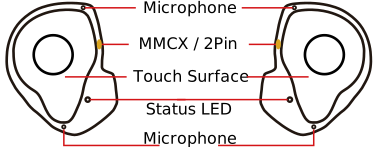
An MMCX cable must be connected via the Orphit MMCX connection. To do this, please press the plug straight and firmly into the socket.
Operation / UI / Touch
Operation / UI / Touch
Orphit has a touch sensor. Simply touch the white surface; it is not necessary to press firmly.
Switch on
Press and hold for 5 seconds on both sides to switch Orphit on
Switch off
Press and hold for 5 seconds on one side to switch off both sides
Play/Pause
Press once to play or pause media
Transparency mode
Press and hold left for 3 seconds until voice prompt to activate transparency mode
Voice Assistant
Press and hold right for 3 seconds until the voice prompt to start the Voice Assistant
Pairing mode
Press and hold for 3 seconds on both sides, even after the tone, to enter pairing mode
LED feedback
The white LED on your Orphit earphones shows you various statuses. Here is what the light signals mean:
Switch on
White light lights up continuously for 1 second
Switch off
White light lights up continuously for 1 second
Pairing mode
Main earphone flashes quickly, the second earphone flashes slowly
Charging process
LED pulsates gently (breathing effect)
Feedback
Feedback is welcome and can be submitted via the contact form or by email.
Cleaning & care
Gentle cleaning
Wipe your Orphit regularly with a soft cloth - gently, without pressure, so that everything stays as it should.
Keep an eye on filters
Over time, earwax can build up on the filters. A slightly sticky adhesive tape is often sufficient for quick cleaning - simply dab it off carefully. Please never push in, bend or pull out the filters - they are permanently installed.
For stubborn soiling
If more should accumulate, you can carefully clean the affected areas with a little isopropanol (alcohol). Do not clean the filter and bushing with alcohol.
Refresh the surface
If the surface of your Orphit looks dull, you can rub it very thinly with a resistant oil such as glycerine. But be careful: the openings and connections must remain free.